Context
What Is Context?
During an investigation, you will often be looking at a raw identifier like a MAC address or an IP address and need to know what it actually is: Which device is this? Is it one of ours? Which network segment does this IP address belong to? Who owns it, and who do I call about it?
The Nzyme Context Engine lets you attach this knowledge to identifiers once and then displays it everywhere the identifier appears in the web interface. Context can be created manually, or in some cases transparently by Nzyme itself, from observed traffic.
Nzyme currently supports the following types of context:
| Type | Applies to | Example |
|---|---|---|
| MAC Addresses | A single MAC address, across WiFi, Ethernet and Bluetooth data | AP_LOBBY_1 for an access point |
| Networks | All IPv4 or IPv6 addresses that fall within a CIDR range | GUEST_WIFI for 10.20.0.0/16 |
All context is managed under the Context menu item in the sidebar of the web interface.
Why Context Matters for Analysts
Nzyme collects a lot of data, but most of it references devices and hosts only by their addresses. Context turns those addresses into something you can reason about at a glance:
- Faster triage. A TCP session from
10.20.14.7to192.0.2.44is just two addresses. The same session shown asGUEST_WIFItoPARTNER_VPNimmediately tells you whether this is expected. - Shared knowledge. Everything the team knows about a device or network segment lives in one place that every analyst sees, instead of in individual spreadsheets or memory.
- Fewer lookups. Owners, ticket numbers, change history, physical location and escalation contacts can all go into the notes of a context entry. Nzyme signals in the overlay if notes exist, so nobody has to leave the page to check.
- Preparation before incidents. Context can be created ahead of time, for example for all of your network segments or for a list of known-bad MAC addresses, so the information is already in place when you need it.
Context Fields
All context types share the same set of fields.
| Field | Required | Limits | Where it is shown |
|---|---|---|---|
| Name | No | Up to 12 characters. Uppercase letters, digits and underscores only. Automatically converted to uppercase. | Inline next to addresses, in context overlays and in tables. This is the field you will see most. |
| Description | No | Up to 32 characters. | In context overlays and on details pages. |
| Notes | No | No limit. Markdown is supported. | On the context details page only. Overlays indicate Has Notes: Yes if notes exist. |
The short limits on name and description are intentional. Both are rendered inline in tables and overlays where space is limited, so they should be short labels. Anything longer belongs into the notes.
Tip
Agree on a naming convention before your team starts creating context. Consistent names like AP_<LOCATION>,
SRV_<ROLE> or VLAN<ID>_<PURPOSE> make tables and overlays much easier to scan than a mix of ad-hoc labels.
Where Context Is Displayed
Context is not confined to the Context pages. Nzyme applies it wherever the underlying identifier appears in the web interface, including session tables, protocol details pages, histograms, asset pages, DNS logs and alert details.
Context Overlays
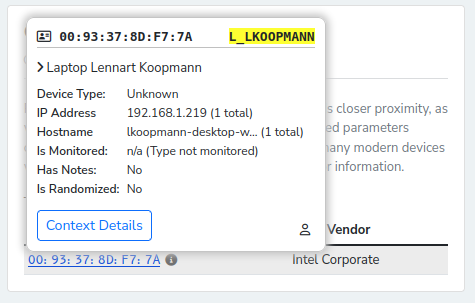
Hovering over a MAC address or an IP address anywhere in the web interface opens a context overlay after a short delay. The overlay summarizes everything Nzyme knows about the address, regardless of whether context has been created for it yet.
For MAC addresses, the overlay shows:
- The context name and description, if any
- The device type (Ethernet device, 802.11/WiFi client, access point or mixed, Bluetooth device)
- The OUI (manufacturer) of the address
- Whether the address is randomized
- IP addresses and hostnames learned through transparent context
- For WiFi access points: whether the BSSID is part of a monitored network
- Whether notes exist
- Links to the context details, the device or asset details page, and a shortcut to create context if none exists yet
For IP addresses, the overlay shows:
- The name and description of the most specific matching network context
- Address attributes (site-local, loopback, multicast)
- The asset associated with the address, if Nzyme has observed it on your local network
- For public addresses: ASN, ASN domain, country and city from GeoIP enrichment
- Whether notes exist
- Links to the IP address details page and the matching network context entries
Inline Labels
Context names are also rendered directly next to addresses in many places, without hovering:
- The name of a MAC address context is shown next to the MAC address and is used as the asset name throughout the asset inventory.
- Site-local IP addresses that belong to a known asset show the asset name next to the address, for example in session tables.
- IP addresses that match at least one network context are marked with an information icon to indicate that additional context is available in the overlay.
Details Pages
- The IP address details page has a Network Context section that lists every network context entry the address falls into, including whether each entry has notes.
- The asset details page shows the network context name for each IP address that was observed for the asset.
MAC Address Context
MAC address context attaches a name, description and notes to a single MAC address. It is subsystem-agnostic: the same context entry applies if the address appears in WiFi, Ethernet or Bluetooth data.
Typical uses for MAC address context include:
- Naming your own infrastructure, such as access points, switches, gateways, printers and servers, so they are recognizable in tables and alerts.
- Marking devices that belong to specific people or teams, so you know who to ask when a device behaves unexpectedly.
- Documenting devices that have been investigated before, including the outcome, so repeat sightings can be triaged quickly.
- Labeling known test equipment, scanners and security tooling that would otherwise look suspicious.
Info
Many client devices use randomized MAC addresses that change over time. Nzyme marks such addresses with a warning icon. Context attached to a randomized address will stop matching once the device rotates to a new address, so it is most useful for infrastructure and other devices with stable addresses.
The context name of a MAC address doubles as the asset name in the Ethernet asset inventory. Setting an asset name on an asset details page creates or updates the MAC address context of that asset. See the difference between Context and Assets below.
MAC address context is also created and enriched automatically with observed IP addresses and hostnames. This is described on the Transparent Context page. Automatically created entries have no name and can be edited to add one.
Network Context
Network context attaches a name, description and notes to a network, specified in CIDR notation. It applies to every IP address inside that network, which makes it the right tool for describing where an address lives rather than what a specific device is.
Typical uses for network context include:
- Labeling your internal segments: user VLANs, guest WiFi, server networks, management networks, OT or IoT segments, VPN address pools and DMZs.
- Labeling external address space you interact with regularly: your own public ranges, cloud provider ranges, SaaS providers, partners or branch offices.
- Marking sensitive or regulated segments, such as cardholder data environments or production control networks, so traffic to and from them stands out.
- Documenting ownership and escalation paths for a segment in the notes, so the responsible team is one click away from any session involving that segment.
CIDR Rules
| Rule | Details |
|---|---|
| IPv4 and IPv6 | Both address families are supported, for example 192.168.0.0/24 or 2001:db8::/32. |
| Public and private | Any network can be described, not only RFC 1918 or site-local ranges. |
| Network address required | The address must be the start of the range. Use 192.168.0.0/24, not 192.168.0.5/24. Nzyme rejects CIDRs with host bits set. |
| Single hosts | To match exactly one address, leave out the prefix length, for example 192.168.0.1. This is equivalent to /32 for IPv4 and /128 for IPv6. |
| One entry per CIDR | Each exact CIDR can only have one context entry per tenant. Overlapping networks with different prefix lengths are allowed and expected. |
The Create Context form shows the first and last address of the range as you type, so you can verify that the CIDR covers what you intend.
Overlapping Networks
An IP address matches every network context whose CIDR contains it. Overlapping entries are useful for describing address space at different levels of detail. For example:
| CIDR | Name | Description |
|---|---|---|
10.0.0.0/8 |
CORP |
Corporate address space |
10.20.0.0/16 |
GUEST |
Guest WiFi |
10.20.5.0/24 |
GUEST_LOB |
Guest WiFi, lobby |
An address like 10.20.5.17 matches all three entries. Nzyme orders matches by prefix length, most specific first. The
context overlay shows the name and description of the most specific match and indicates how many more entries matched.
The IP address details page lists all matching entries.
The Difference Between Context and Assets
Context and Assets are related concepts that work together closely, but they differ in an important way:
- Context is knowledge you attach to an identifier. It can be created for any MAC address or network, no matter if Nzyme has observed it or not. It never expires on its own.
- Assets are devices Nzyme has actually observed in Ethernet traffic. They are built from the data stream and only exist after the device has been seen. Assets are enriched with context, not the other way around.
For example, you can create MAC address context for all devices in a procurement list before they are ever plugged in. Once a device appears on the network, the asset is created and the context is applied to it immediately. Network context has no asset equivalent, because a network is not a device. It complements the asset inventory by telling you which segment an observed asset or connection belongs to.
Future development of Nzyme will make more use of context and further delineate between the two concepts.
Managing Context
Creating Context
Select the context type under the Context menu item in your sidebar and click Create Context. For MAC addresses, you can also click Add Context in the context overlay of any MAC address that has no context yet, which opens the form with the address pre-filled.
Context is always created in the organization and tenant that is currently selected in the web interface. It is not shared across tenants.
Editing and Deleting Context
Open a context entry from its list page or through the Context Details button of a context overlay. The details page shows all fields, the rendered notes, creation and update timestamps, and for MAC addresses the transparently learned IP addresses and hostnames. Users with the required permissions can edit or delete the entry from there.
Transparently created MAC address context can be edited like any other context to add a name, description and notes. If you delete the context of a MAC address that is still being observed, Nzyme will transparently re-create it without a name.
Finding Context
The list pages show all context entries of the selected tenant, with pagination. Use the filter field to narrow the list by a partial MAC address or by a partial CIDR.
Propagation of Changes
Nzyme caches context lookups on every node to keep the web interface fast. Creating, editing or deleting context invalidates the caches across the whole cluster, but it can take a few seconds until the change is visible everywhere.
Required Permissions
All users can view all types of context.
All super administrators, organization administrators as well as tenant users with the following permissions can create, edit and delete context:
| Permission | Allows |
|---|---|
| Manage MAC Address Context | Create, edit and delete MAC address context for all subsystems, like 802.11/WiFi or Ethernet. This includes setting asset names. |
| Manage Ethernet Network Context | Create, edit and delete network (CIDR) context. |
Retention
Manually created context is never retention cleaned. It stays until a user deletes it.
Transparently learned IP addresses and hostnames attached to MAC address context are subject to retention cleaning as described on the Transparent Context page.